Arduino UNO R4 WiFi で外気温を測る ④ 7セグメントLEDに温度、湿度、気圧を表示
前回、4桁7セグメントLEDを1個マイコン・ボードにつなぎ、WebClientで受信した温度データを表示しました。
センサBME280は気圧、温度、湿度の三つの値を測定できるので、クライアント側でも、7セグメントLEDを3個つないで測定値を表示します。
2台のマイコン・ボードの役割です。
- Arduino UNO R4 WiFi ① センサBME280で気圧、温度、湿度を測定し、Webサーバを運用
- Arduino UNO R4 WiFi ② ①をアクセスするWebClientを動かして、センサ・データを受け取り、7セグメントLEDに温度、湿度、気圧を表示
●環境
- Arduino IDE;2.3.10
- Windows11;25H2
- Arduino UNO R4 WiFi 1.5.3 PCはマザーボードのUSBポートから直接つなぐ。
- HT16K33@0.4.3
●4桁の7セグメントLED
アマゾンで購入したLEDディスプレイ 4桁 0.56インチです。裏面にI2Cのスレーブ・アドレスを変更するはんだジャンパがあります。購入時のデフォルトは0x70です。
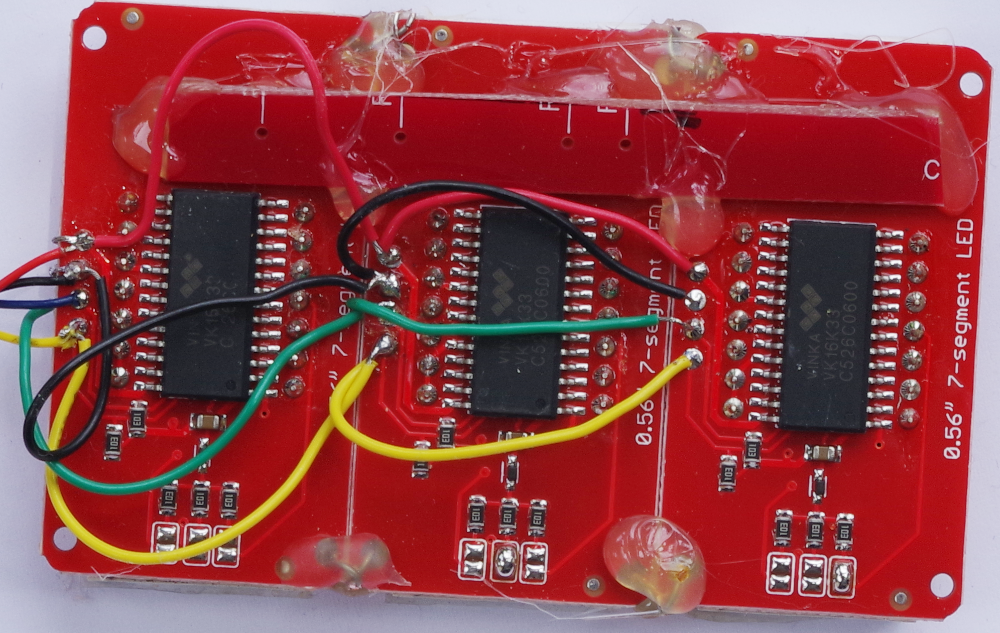
3個をパラレルにつなぎます。二つの信号と電源ラインをそれぞれつないでいきます。
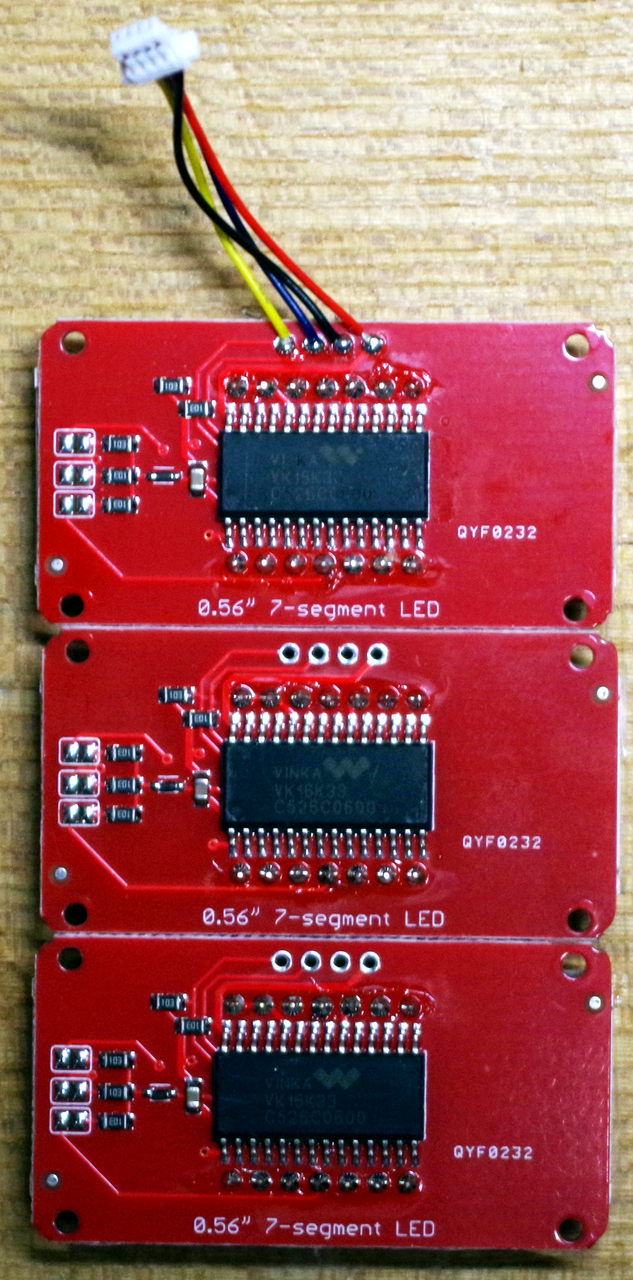
基板の裏側に3か所のジャンパがあるので、2枚目と3枚目を1か所ずつショートします。4本の信号線と電源線を相互にはんだ付けします。
ホットメルトを使って、基板同士を固定し、補強します。
●スレーブ・アドレスを知る
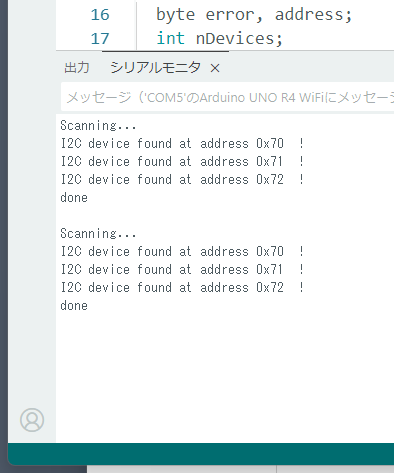
マイコン・ボードのQWIICコネクタに接続し、scannerを動かします。0x70、0x71、0x72が見つかりました。ジャンパ位置によってはこれらの値と異なるかもしれませんが、スケッチ上でインスタンスを作るときに、対応するスレーブ・アドレスを記入するので、いずれの値であっても使えます。
●表示テストのスケッチ
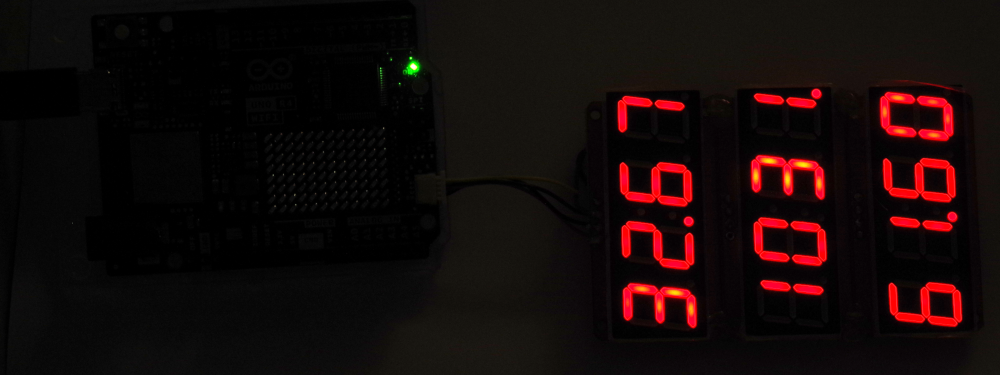
三つの7セグLEDを表示するスケッチです。表示する数値データはダミーです。
#include "HT16K33.h"

HT16K33 T(0x70, &Wire1);
HT16K33 P(0x72, &Wire1);
HT16K33 H(0x71, &Wire1);

uint32_t counter = 0;

void setup(){
  Serial.begin(9600);
  delay(3000);
  Serial.println();
  Serial.println(__FILE__);
  Serial.print("HT16K33_LIB_VERSION: ");
  Serial.println(HT16K33_LIB_VERSION);
  Serial.println();

  Wire1.begin();
  Wire1.setClock(100000);

  T.begin();
  P.begin();
  H.begin();

  T.displayOn();
  P.displayOn();
  H.displayOn();

  Serial.println("triple displayTest");
}

void loop(){
  T.displayClear();
  P.displayClear();
  H.displayClear();

  T.displayFloat(25.67 + counter);
  P.displayFloat(1010 + counter);
  H.displayFloat(54.67 + counter);
  delay(3000);
  counter++;
}
●WebClientで三つの値を表示する
Webサーバから受け取った三つの測定データを三つの4桁7セグメントLEDにそれぞれ表示するスケッチです。
#include <math.h>
#include "WiFiS3.h"
#include <Arduino_JSON.h>
JSONVar temperature, pressure, humidity;
float Temperature, Pressure, Humidity;
uint8_t  buf[256] ;

#include "arduino_secrets.h"
char ssid[] = SECRET_SSID;        // your network SSID (name)
char pass[] = SECRET_PASS;    // your network password (use for WPA, or use as key for WEP)

#include "HT16K33.h"
HT16K33 T(0x70, &Wire1);
HT16K33 P(0x72, &Wire1);
HT16K33 H(0x71, &Wire1);

int status = WL_IDLE_STATUS;
IPAddress server(192,168,111,102);  // numeric IP for Google (no DNS)

WiFiClient client;

void setup() {
  //Initialize serial and wait for port to open:
  Serial.begin(9600);
    delay(3000);
  Serial.println("\nstart WebClient received JSON HT16K33");

  Wire1.begin();
  Wire1.setClock(100000);
  T.begin();
  P.begin();
  H.begin();
  delay(1000);
  T.displayOn();
  P.displayOn();
  H.displayOn();
  delay(1000);
  T.displayClear();
  P.displayClear();
  H.displayClear();
  delay(1000);
  // check for the WiFi module:
  if (WiFi.status() == WL_NO_MODULE) {
    Serial.println("Communication with WiFi module failed!");
    // don't continue
    while (true);
  }

  String fv = WiFi.firmwareVersion();
  if (fv < WIFI_FIRMWARE_LATEST_VERSION) {
    Serial.println("Please upgrade the firmware");
  }

  // attempt to connect to WiFi network:
  while (status != WL_CONNECTED) {
    Serial.print("Attempting to connect to SSID: ");
    Serial.println(ssid);
    // Connect to WPA/WPA2 network. Change this line if using open or WEP network:
    status = WiFi.begin(ssid, pass);

    // wait 10 seconds for connection:
    delay(10000);
  }

  printWifiStatus();

  Serial.println("\nStarting connection to server...");
  // if you get a connection, report back via serial:
  if (client.connect(server, 80)) {
    Serial.println("connected to server");
    // Make a HTTP request:
    client.println("GET /search?q=arduino HTTP/1.1");
    client.println("Host: www.google.com");
    client.println("Connection: close");
    client.println();
  }
}

String strbuf;
void read_response() {

  while (client.available()) {
    while (true){
      client.read(buf, sizeof(buf));
      //Serial.print("read 1line: ");Serial.println((char*)buf);  // 1line read

      strbuf = String((char*)buf);
      int kakko = strbuf.indexOf("{");
      //Serial.println("find {  ");Serial.println(kakko);
      if (kakko != -1){
        break;
      }
    }
    String kakkoikou = strbuf.substring(strbuf.indexOf("{"));
    //Serial.println(kakkoikou);
    //Serial.println(kakkoikou.length());
    kakkoikou.toCharArray((char*)buf, kakkoikou.length());

    JSONVar senserObject = JSON.parse((const char*)buf);

    Serial.print("senserObject: ");Serial.println(senserObject);
      if  (isnan((double) senserObject["temperature"])) {
        break;
      }
    Temperature = (double) senserObject["temperature"];
    Pressure = (double) senserObject["pressure"];
    Humidity = (double) senserObject["humidity"];
    Serial.print("\nTemperature = ");
    Serial.println(Temperature);
    Serial.print("Pressure = ");
    Serial.println(Pressure);
    Serial.print("Humidity = ");
    Serial.println(Humidity);
  }
}

void loop() {
  read_response();
  Serial.println("read from server.");
    T.displayClear();
    P.displayClear();
    H.displayClear();
    // delay(10);
    T.displayFloat(Temperature);
    P.displayFloat(Pressure);
    H.displayFloat(Humidity);
    delay(3000);
  // if the server's disconnected, stop the client:

  if (!client.connected()) {
    Serial.println();
    Serial.println("disconnecting from server.");
    client.stop();
  }
    delay(1000);
    Serial.println("Reconnected to server");
    client.connect(server, 80);
    // Make a HTTP request:
    client.println("GET /search?q=arduino HTTP/1.1");
    client.println("Host: www.google.com");
    client.println("Connection: close");
    client.println();

  delay(1000);
}

void printWifiStatus() {
  // print the SSID of the network you're attached to:
  Serial.print("Status connected SSID: ");
  Serial.print(WiFi.SSID());
  Serial.print(" ");Serial.print(WiFi.localIP());
  Serial.print(" ; ");Serial.print(WiFi.RSSI());
}
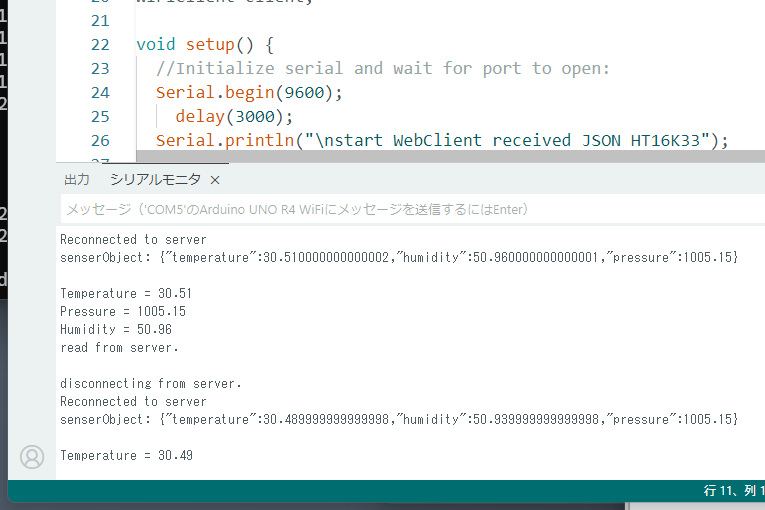
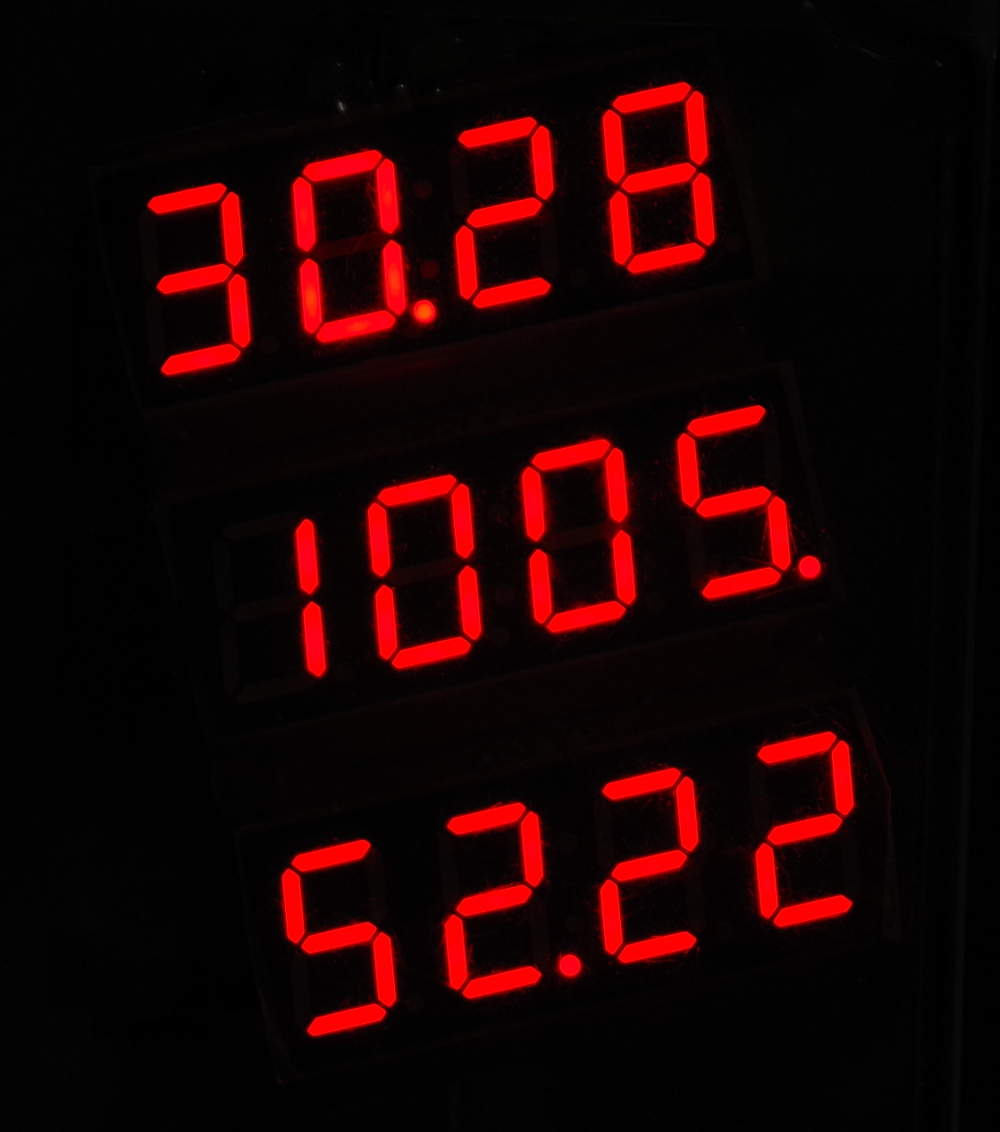
実行中の様子です。
●連続表示に変更
今までは、接続したら終了でしたが、常に最新のデータを読む形に変更します。
WebサーバのIPアドレスは192.168.111.102です。
arduino_secrets.hは今までと同じなので省略します。
本体b401.inoのスケッチです。
#include <math.h>
#include "WiFiS3.h"
#include <Arduino_JSON.h>
JSONVar temperature, pressure, humidity;
float Temperature, Pressure, Humidity;
uint8_t  buf[256] ;

#include "arduino_secrets.h"
char ssid[] = SECRET_SSID;        // your network SSID (name)
char pass[] = SECRET_PASS;    // your network password (use for WPA, or use as key for WEP)

#include "HT16K33.h"
HT16K33 T(0x70, &Wire1);
HT16K33 P(0x72, &Wire1);
HT16K33 H(0x71, &Wire1);

int status = WL_IDLE_STATUS;
IPAddress server(192,168,111,102);  // numeric IP for Google (no DNS)

WiFiClient client;

void setup() {
  //Initialize serial and wait for port to open:
  Serial.begin(9600);
    delay(3000);
  Serial.println("\nstart WebClient received JSON HT16K33");

  Wire1.begin();
  Wire1.setClock(100000);
  T.begin();
  P.begin();
  H.begin();
  delay(1000);
  T.displayOn();
  P.displayOn();
  H.displayOn();
  delay(1000);
  T.displayClear();
  P.displayClear();
  H.displayClear();
  delay(1000);
  // check for the WiFi module:
  if (WiFi.status() == WL_NO_MODULE) {
    Serial.println("Communication with WiFi module failed!");
    // don't continue
    while (true);
  }

  String fv = WiFi.firmwareVersion();
  if (fv < WIFI_FIRMWARE_LATEST_VERSION) {
    Serial.println("Please upgrade the firmware");
  }

  // attempt to connect to WiFi network:
  while (status != WL_CONNECTED) {
    Serial.print("Attempting to connect to SSID: ");
    Serial.println(ssid);
    // Connect to WPA/WPA2 network. Change this line if using open or WEP network:
    status = WiFi.begin(ssid, pass);

    // wait 10 seconds for connection:
    delay(10000);
  }

  printWifiStatus();

  Serial.println("\nStarting connection to server...");
  // if you get a connection, report back via serial:
  if (client.connect(server, 80)) {
    Serial.println("connected to server");
    // Make a HTTP request:
    client.println("GET /search?q=arduino HTTP/1.1");
    client.println("Host: www.google.com");
    client.println("Connection: close");
    client.println();
  }
}

String strbuf;
void read_response() {

  while (client.available()) {
    while (true){
      client.read(buf, sizeof(buf));
      //Serial.print("read 1line: ");Serial.println((char*)buf);  // 1line read

      strbuf = String((char*)buf);
      int kakko = strbuf.indexOf("{");
      //Serial.println("find {  ");Serial.println(kakko);
      if (kakko != -1){
        break;
      }
    }
    String kakkoikou = strbuf.substring(strbuf.indexOf("{"));
    //Serial.println(kakkoikou);
    //Serial.println(kakkoikou.length());
    kakkoikou.toCharArray((char*)buf, kakkoikou.length());

    JSONVar senserObject = JSON.parse((const char*)buf);

    Serial.print("senserObject: ");Serial.println(senserObject);
      if  (isnan((double) senserObject["temperature"])) {
        break;
      }
    Temperature = (double) senserObject["temperature"];
    Pressure = (double) senserObject["pressure"];
    Humidity = (double) senserObject["humidity"];
    Serial.print("\nTemperature = ");
    Serial.println(Temperature);
    Serial.print("Pressure = ");
    Serial.println(Pressure);
    Serial.print("Humidity = ");
    Serial.println(Humidity);
  }
}

void loop() {
  read_response();
  Serial.println("read from server.");
    T.displayClear();
    P.displayClear();
    H.displayClear();
    // delay(10);
    T.displayFloat(Temperature);
    P.displayFloat(Pressure);
    H.displayFloat(Humidity);
    delay(3000);
  // if the server's disconnected, stop the client:

  if (!client.connected()) {
    Serial.println();
    Serial.println("disconnecting from server.");
    client.stop();
  }
    delay(1000);
    Serial.println("Reconnected to server");
    client.connect(server, 80);
    // Make a HTTP request:
    client.println("GET /search?q=arduino HTTP/1.1");
    client.println("Host: www.google.com");
    client.println("Connection: close");
    client.println();

  delay(1000);
}

void printWifiStatus() {
  // print the SSID of the network you're attached to:
  Serial.print("Status connected SSID: ");
  Serial.print(WiFi.SSID());
  Serial.print(" ");Serial.print(WiFi.localIP());
  Serial.print(" ; ");Serial.print(WiFi.RSSI());
}
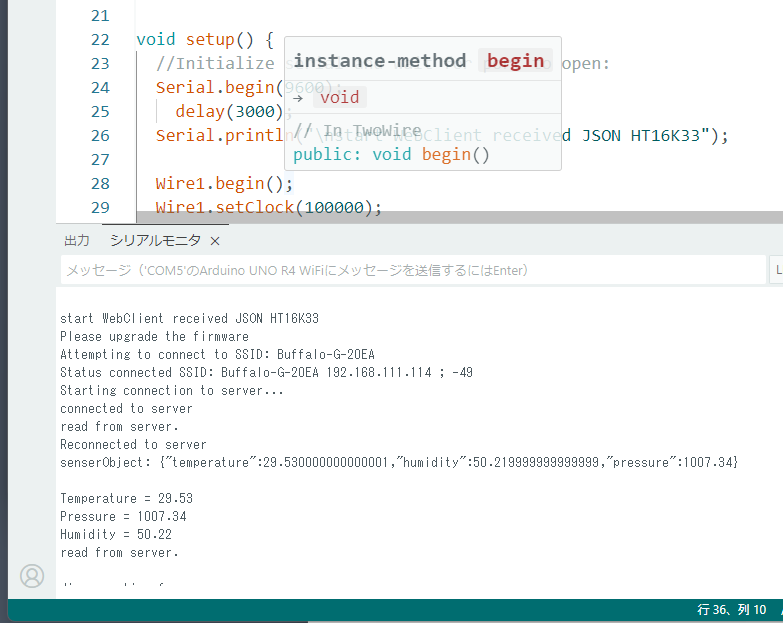
PCにつないだ時の実行中の様子です。
PCからUSBケーブルを外し、独立した5V電源をつなぐと、四阿署7セグメントLEDはランダムな点灯をし、消去、全部0表示をした後、受信したセンサの各値を表示します。
暴走する
何度か動作させましたが、数時間後に表示が止まってしまいます。
残念ながら原因がわかりません。
